专栏文章
如何叉掉爸妈用了100年的Microsoft Family Safet
科技·工程参与者 1已保存评论 0
文章操作
快速查看文章及其快照的属性,并进行相关操作。
- 当前评论
- 0 条
- 当前快照
- 1 份
- 快照标识符
- @mincjvz6
- 此快照首次捕获于
- 2025/12/02 00:11 3 个月前
- 此快照最后确认于
- 2025/12/02 00:11 3 个月前
很多同学家里爸妈都为他准备了一台 Win10 高级电脑来学习信息学,当同学们高高兴兴地想要打开 Florr 时,这时候该死的 Microsoft Family Safety 跳了出来,把你像足球踢出了球门,这时候,你该怎么办?
答案:把球门封住。
一次,我准备写题解,但是article被禁了,可是在 Microsoft Family Safety 准备踢走你的时候,他出现了:
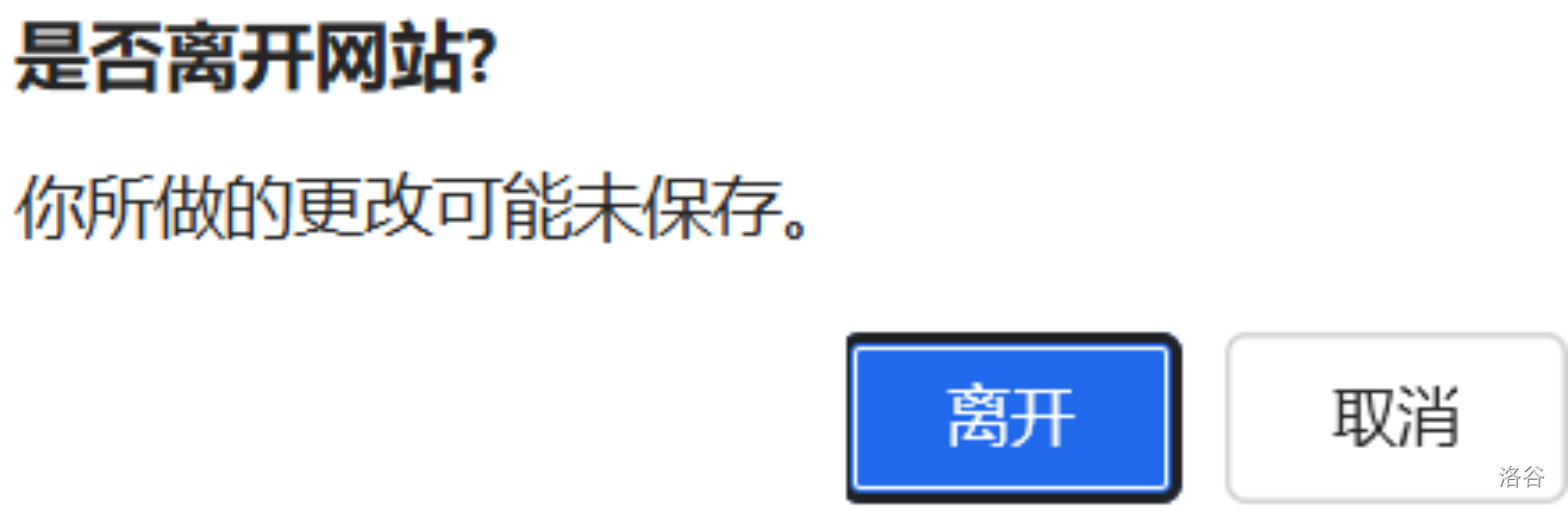
按下取消,我们发现,网址竟然停在了写题解的画面。
于是我们想到,如果写一个篡改猴程序,每次更改页面,就弹窗,那就可以随意出入了?
于是我们写下以下 javescript 代码:
CPP// ==UserScript==
// @name 叉掉Microsoft Family Safet
// @namespace http://tampermonkey.net/
// @version 1.0
// @description 叉掉Microsoft Family Safet
// @author You
// @match *://*/*
// @grant none
// @run-at document-start
// ==/UserScript==
(function()
{
'use strict';
let pageStateChanged=false;
let isProgrammaticChange=false;
let originalHref=window.location.href;
let originalTitle=document.title;
let originalState=null;
function createStateSnapshot()
{
return{
href:window.location.href,
title:document.title,
state:history.state,
timestamp:Date.now(),
formData:getFormData(),
scrollPosition:{x:window.scrollX,y:window.scrollY}
};
}
let currentState=createStateSnapshot();
function getFormData()
{
const forms=document.querySelectorAll('form');
const formData={};
forms.forEach((form,index)=>
{
const inputs=form.querySelectorAll('input,textarea,select');
formData[`form_${index}`]=Array.from(inputs).map(input=>({name:input.name||input.id,value:input.value,type:input.type}));
});
return formData;
}
function hasStateChanged()
{
const newState=createStateSnapshot();
if(newState.href!==currentState.href)
return true;
if(newState.title!==currentState.title)
return true;
if(JSON.stringify(newState.state)!==JSON.stringify(currentState.state))
return true;
const oldForms=currentState.formData;
const newForms=newState.formData;
if(Object.keys(oldForms).length!==Object.keys(newForms).length)
return true;
for(const formKey in oldForms)
{
if(!newForms[formKey])
return true;
if(oldForms[formKey].length!==newForms[formKey].length)
return true;
for(let i=0;i<oldForms[formKey].length;i++)
{
const oldInput=oldForms[formKey][i];
const newInput=newForms[formKey][i];
if(oldInput.value!==newInput.value)
return true;
}
}
return false;
}
function showConfirmDialog()
{
if(isProgrammaticChange)
return true;
const userChoice=confirm("确定离开?\n\n确定\n取消");
if(userChoice)
{
currentState=createStateSnapshot();
pageStateChanged=false;
return true;
}
else
{
restorePreviousState();
return false;
}
}
function restorePreviousState()
{
isProgrammaticChange=true;
if(window.location.href!==currentState.href)
history.replaceState(currentState.state,'',currentState.href);
if(document.title!==currentState.title)
document.title=currentState.title;
restoreFormData();
window.scrollTo(currentState.scrollPosition.x,currentState.scrollPosition.y);
setTimeout(()=>{isProgrammaticChange=false;},100);
}
function restoreFormData()
{
const forms=document.querySelectorAll('form');
forms.forEach((form,index)=>
{
const formKey=`form_${index}`;
if(currentState.formData[formKey])
{
const inputs=form.querySelectorAll('input, textarea, select');
currentState.formData[formKey].forEach((inputData,inputIndex)=>
{
if(inputs[inputIndex])
inputs[inputIndex].value=inputData.value;
});
}
});
}
function markStateChanged()
{
if(isProgrammaticChange)
return;
if(!pageStateChanged&&hasStateChanged())
{
pageStateChanged=true;
console.log('已改变');
}
}
const originalPushState=history.pushState;
const originalReplaceState=history.replaceState;
history.pushState=function(state,title,url)
{
const result=originalPushState.apply(this,arguments);
markStateChanged();
return result;
};
history.replaceState=function(state,title,url)
{
const result=originalReplaceState.apply(this,arguments);
markStateChanged();
return result;
};
const events=['hashchange','popstate','load','input','change','click','submit','keydown','keyup','mousedown','mouseup'];
events.forEach(eventType=>
{
window.addEventListener(eventType,function(e){setTimeout(markStateChanged,10);},true);
});
window.addEventListener('beforeunload',function(e)
{
if(pageStateChanged&&!isProgrammaticChange)
{
if(!showConfirmDialog())
{
e.preventDefault();
e.returnValue='';
return '';
}
}
});
document.addEventListener('submit',function(e)
{
if(pageStateChanged&&!isProgrammaticChange)
{
if(!showConfirmDialog())
{
e.preventDefault();
e.stopImmediatePropagation();
return false;
}
}
},true);
document.addEventListener('click',function(e)
{
const target=e.target.closest('a');
if(target&&target.href&&pageStateChanged&&!isProgrammaticChange)
{
if(!showConfirmDialog())
{
e.preventDefault();
e.stopImmediatePropagation();
return false;
}
}
},true);
setInterval(()=>
{
markStateChanged();
},500);
window.resetPageState=function()
{
currentState=createStateSnapshot();
pageStateChanged=false;
console.log('页面状态已重置');
};
console.log('页面状态变化监控脚本已加载');
})();
注意打开开发者模式,在这里打开。
完结撒花!
相关推荐
评论
共 0 条评论,欢迎与作者交流。
正在加载评论...