专栏文章
浅谈requests库
科技·工程参与者 34已保存评论 35
文章操作
快速查看文章及其快照的属性,并进行相关操作。
- 当前评论
- 35 条
- 当前快照
- 1 份
- 快照标识符
- @mhz5sh90
- 此快照首次捕获于
- 2025/11/15 01:55 4 个月前
- 此快照最后确认于
- 2025/11/29 05:25 3 个月前

本文为ShyButHandsome的原创作品,转载请注明出处
前言
爬虫技术能为我们在互联网世界带来很多的便利,所以就让我们来了解了解吧!
本文只提到
requests库的使用,而没有BeautifulSoup等。换句话来说就是想学好爬虫只会这个是不够的,
但,篇幅有限。
关于爬虫
爬虫是什么?能干什么?
爬虫是什么?
先来段百度百科的定义,
网络爬虫(又称为网页蜘蛛,网络机器人,在 FOAF 社区中间,更经常的称为网页追逐者),是一种按照一定的规则,自动地抓取万维网信息的程序或者脚本。
抓取信息
(get)是没什么意义的,理论上来讲,只要你在浏览器里能看见的,爬虫都能爬下来,
但抓取的过程就很有意思,
还有抓取后的解析提取,
解析提取后的数据分析,
对数据建模。
但,本文不讲后面几项!
本文主要研究怎么获取这些信息。
爬虫能干什么?
这个也蛮有意思,
你可以通过暴露出来的
API,实现很多。比如:
- 下载一些没有主动提供给用户下载按钮的东西。
- 比如:下载洛谷的网课(假如那么容易就让你拿到,那洛谷还卖什么?)
- 又比如:下载网易云音乐的歌曲
- 实现定时领游戏礼包。
- 比如:球球大作战刷棒棒糖
- 以及很多好玩的东西
理论上来讲,你在浏览器中的一切操作,都可以通过爬虫模拟。
关于 requests
官方原话如下
Requests is an elegant and simple HTTP library for Python, built for human beings.Behold, the power of Requests:PYTHON>>> r = requests.get('https://api.github.com/user', auth=('user', 'pass')) >>> r.status_code 200 >>> r.headers['content-type'] 'application/json; charset=utf8' >>> r.encoding 'utf-8' >>> r.text '{"type":"User"...' >>> r.json() {'private_gists': 419, 'total_private_repos': 77, ...}Requests allows you to send HTTP/1.1 requests extremely easily.There’s no need to manually add query strings to your URLs, or to form-encode your POST data. Keep-alive and HTTP connection pooling are 100% automatic, thanks to urllib3.
他的中文文档也很有意思:
Requests 唯一的一个非转基因的 Python HTTP 库,人类可以安全享用。警告:非专业使用其他 HTTP 库会导致危险的副作用,包括:安全缺陷症、冗余代码症、重新发明轮子症、啃文档症、抑郁、头疼、甚至死亡。看吧,这就是 Requests 的威力:PYTHON>>> r = requests.get('https://api.github.com/user', auth=('user', 'pass')) >>> r.status_code 200 >>> r.headers['content-type'] 'application/json; charset=utf8' >>> r.encoding 'utf-8' >>> r.text '{"type":"User"...' >>> r.json() {'private_gists': 419, 'total_private_repos': 77, ...}Requests 允许你发送纯天然,植物饲养的 HTTP/1.1 请求,无需手工劳动。你不需要手动为 URL 添加查询字串,也不需要对 POST 数据进行表单编码。Keep-alive 和 HTTP 连接池的功能是 100% 自动化的,一切动力都来自于根植在 Requests 内部的 urllib3。
前置知识
Python
如果你以前没有接触过
Python的话,需要先去了解Python的基础语法哦!有
C/C++基础的话,半小时入门吧!HTTP
维基百科对它的定义
The Hypertext Transfer Protocol (HTTP) is an application protocol for distributed, collaborative, hypermedia information systems.[1]
HTTP是一个用于传输超媒体文档(例如 HTML)的应用层协议。先不用管什么应用层、什么协议、什么超媒体文档。
想深入了解可以百度:计算机网络、HTTP(链接直达 MDN web docs)。
你暂且需要知道常用的两个方法,
GET是从别人那里拿过来。POST是从自己这里给别人,如果你们之间有约定的话,他就会还给你约定好的东西。
其他的也好理解的。
安装
SHELLpip install requests # 是requests而不是request(有s的)
requests 的简单使用
PYTHON# requests的简单使用,可以跟着写,看看效果就行,后面会更仔细细讲
import requests
r = requests.get("https://www.baidu.com") # 构造一个Request对象, 返回一个Response对象
print(r.status_code) # 查看状态码,检查是否成功,200则为成功
print(r.encoding) # 查看当前编码,默认为header的charset字段
print(r.apparent_encoding) # 查看requests根据上下文判断的编码(备选编码)
r.encoding = 'utf-8' # 此处我们是已知网页编码才这么写
# 一般来说,我们都是采取r.encoding = r.apparent_encoding 的方式让它自己转换编码
print(r.text) # 查看获取到的网页内容
简单拓展:(后续会更加详细的讲)
| 方法 | 说明 | 对应HTTP(方法) |
|---|---|---|
requests.request() | 构造一个请求,支撑以下各方法的基础方法 | |
requests.get() | 获取HTML网页的主要方法 | GET |
requests.head() | 获取HTML网页头信息的方法 | HEAD |
requests.post() | 向HTML网页提交POST请求的方法 | POST |
requests.put() | 向HTML网页提交PUT请求的方法 | PUT |
requests.patch() | 向HTML网页提交局部修改请求 | PATCH |
requsets.delete() | 向HTML页面提交删除请求 | DELETE |
从requests.get()方法看requests库
PYTHONr = requests.get(url)
requests.get()方法会- 构造一个向服务器请求资源的
Requset对象 - 返回一个包含服务器资源的
Response对象
这里的
PYTHONResponse对象就是rtype(r)
<class 'requests.models.Response'>
# 即, r是一个Response对象
r储存着所有从服务器返回的资源,同时也包含了我们向服务器请求的Request的信息。理解下这句话 , 把你想象成
r ,你去 朋友家(服务器) 做客,去之前先告诉你朋友你要去(向服务器提交一个request请求) 的时候(也许)带了东西(参数),回来的时候(也许)带了东西(服务器返回的资源)。这大致就是
HTTP的工作原理。requests.get()的完整使用:
PYTHONrequests.get(url, params = None, **kwargs)
url: 拟获取(目标网站)的链接params:url中的额外参数,字典或字节流格式(可选)**kwargs个控制访问的参数(可选)
探秘get()方法:
以下是
PYTHONrequsets/api.py文件中的部分内容def get(url, params=None, **kwargs):
"""Sends a GET request.
:param url: URL for the new :class:`Request` object.
:param params: (optional) Dictionary,
list of tuples or bytes to send in the query string for the :class:`Request`.
:param \*\*kwargs: Optional arguments that ``request`` takes.
:return: :class:`Response <Response>` object
:rtype: requests.Response
"""
kwargs.setdefault('allow_redirects', True)
return request('get', url, params=params, **kwargs)
我们可以发现:(在上面的最后一行
return语句)get()方法是由requsets()方法封装得来的requests库一共提供了个常用方法,| 方法 | 说明 | 对应HTTP(方法) |
|---|---|---|
requests.request() | 构造一个请求,支撑以下各方法的基础方法 | |
requests.get() | 获取HTML网页的主要方法 | GET |
requests.head() | 获取HTML网页头信息的方法 | HEAD |
requests.post() | 向HTML网页提交POST请求的方法 | POST |
requests.put() | 向HTML网页提交PUT请求的方法 | PUT |
requests.patch() | 向HTML网页提交局部修改请求 | PATCH |
requsets.delete() | 向HTML页面提交删除请求 | DELETE |
实际上:
除了
request()方法外其他个方法都是通过调用
request()方法来实现的前面提到的:
requests.get()方法会
- 构造一个向服务器请求资源的
Requset对象- 返回一个包含服务器资源的
Response对象
requests.get()方法构造出的Response对象实质上是requests()方法构造出来的你甚至可以说
requests库只有一个方法:requests.request()requests.request()构造出了两个重要的对象Request对象(负责发请求),和Resopnse对象(储存返回信息)而这个
Response对象包含了爬虫返回的全部内容,当属重中之重Response对象的几个常见且重要属性:属性(r代表一个Response对象) | 说明 |
|---|---|
r.status_code | HTTP请求的返回状态,表示连接成功,(等)表示连接失败 |
r.text | HTTP响应内容的字符串形式,即,url对应的页面内容 |
r.encoding | 从HTTP header中猜测的相应内容的编码方式 |
r.apparent_encoding | 从内容中分析出相应内容编码方式(备选编码方式) |
r.content | HTTP响应内容的二进制形式 |
关于编码:
r.encoding会从header的charset字段读取编码信息,如果不存在
charset字段,则默认编码为ISO-8859-1关于
Response对象举几个小例子:r.status_code: 和我们常见的"404,网站不见了"是一个道理r.text: 字符串形式储存着网页源码,编码方式是可以变的r.content: 假设你现在get()到了一个图片,那么这个图片,就是用二进制的形式存储的,那么就可以通过r.content来还原这张图片
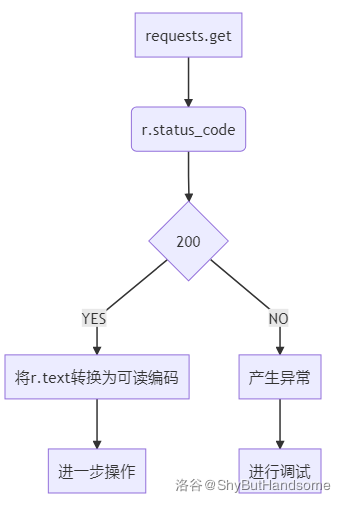
爬取网页信息的基本流程:
# 在python console的实践(实践出真知)
>>> import requests
>>>
>>> r = requests.get("https://www.baidu.com")
>>>
>>> type(r)
<class 'requests.models.Response'>
>>>
>>> r.status_code # 查看当前状态码,非200则产生了异常
200
>>> # 状态码为200没有问题,可以进行下一步操作
...
>>> r.encoding
'ISO-8859-1'
>>> # 默认就是'ISO-8859-1',但这种编码方式并不支持中文,我们可以直接打印试试
...
>>> r.text # 好长,不用仔细看
'
<!DOCTYPE html>\r\n
<!--STATUS OK-->
<html>
<head>
<meta http-equiv=content-type content=text/html;charset=utf-8>
<meta http-equiv=X-UA-Compatible content=IE=Edge>
<meta content=always name=referrer>
<link rel=stylesheet type=text/css href=https://ss1.bdstatic.com/5eN1bjq8AAUYm2zgoY3K/r/www/cache/bdorz/baidu.min.css>
<title>ç\x99¾åº¦ä¸\x80ä¸\x8bï¼\x8cä½\xa0å°±ç\x9f¥é\x81\x93</title>
</head>
<body link=#0000cc>
<div id=wrapper>
<div id=head>
<div class=head_wrapper>
<div class=s_form>
<div class=s_form_wrapper>
<div id=lg> <img hidefocus=true src=//www.baidu.com/img/bd_logo1.png width=270 height=129>
</div>
<form id=form name=f action=//www.baidu.com/s class=fm> <input type=hidden name=bdorz_come value=1> <input
type=hidden name=ie value=utf-8> <input type=hidden name=f value=8>
<input type=hidden name=rsv_bp value=1> <input type=hidden name=rsv_idx value=1> <input type=hidden
name=tn value=baidu><span class="bg s_ipt_wr"><input id=kw name=wd class=s_ipt value maxlength=255
autocomplete=off autofocus=autofocus></span><span class="bg s_btn_wr"><input type=submit id=su
value=ç\x99¾åº¦ä¸\x80ä¸\x8b class="bg s_btn" autofocus></span> </form>
</div>
</div>
<div id=u1> <a href=http://news.baidu.com name=tj_trnews class=mnav>æ\x96°é\x97»</a> <a
href=https://www.hao123.com name=tj_trhao123 class=mnav>hao123</a> <a href=http://map.baidu.com
name=tj_trmap class=mnav>å\x9c°å\x9b¾</a> <a href=http://v.baidu.com name=tj_trvideo
class=mnav>è§\x86é¢\x91</a> <a href=http://tieba.baidu.com name=tj_trtieba class=mnav>è´´å\x90§</a>
<noscript> <a
href=http://www.baidu.com/bdorz/login.gif?login&tpl=mn&u=http%3A%2F%2Fwww.baidu.com%2f%3fbdorz_come%3d1
name=tj_login class=lb>ç\x99»å½\x95</a> </noscript>
<script>document.write(\'<a href="http://www.baidu.com/bdorz/login.gif?login&tpl=mn&u=\'+ encodeURIComponent(window.location.href+ (window.location.search === "" ? "?" : "&")+ "bdorz_come=1")+ \'" name="tj_login" class="lb">ç\x99»å½\x95</a>\');\r\n </script>
<a href=//www.baidu.com/more/ name=tj_briicon class=bri style="display: block;">æ\x9b´å¤\x9a产å\x93\x81</a>
</div>
</div>
</div>
<div id=ftCon>
<div id=ftConw>
<p id=lh> <a href=http://home.baidu.com>å\x85³äº\x8eç\x99¾åº¦</a> <a href=http://ir.baidu.com>About
Baidu</a> </p>
<p id=cp>©2017 Baidu <a
href=http://www.baidu.com/duty />使ç\x94¨ç\x99¾åº¦å\x89\x8då¿\x85读</a> <a
href=http://jianyi.baidu.com/
class=cp-feedback>æ\x84\x8fè§\x81å\x8f\x8dé¦\x88</a> 京ICPè¯\x81030173å\x8f· <img
src=//www.baidu.com/img/gs.gif> </p>
</div>
</div>
</div>
</body>
</html>\r\n'
>>>
>>> # 可以发现出现了乱码(不出现才怪)
... # 接下来我们需要将r.text转换为可读编码,就是r.encoding和r.apparent_encoding的使用
...
>>> r.apparent_encoding # 查看备选编码方式
'utf-8'
>>> r.encoding = 'utf-8' # 或者直接r.encoding = r.apparent_encoding
>>>
>>> r.encoding
'utf-8'
>>> r.encoding # 检查是否成功改变编码方式
'utf-8'
>>> # 成功更换,接下来看看效果吧
...
>>> r.text # 好长,不用仔细看
'
<!DOCTYPE html>\r\n
<!--STATUS OK-->
<html>
<head>
<meta http-equiv=content-type content=text/html;charset=utf-8>
<meta http-equiv=X-UA-Compatible content=IE=Edge>
<meta content=always name=referrer>
<link rel=stylesheet type=text/css href=https://ss1.bdstatic.com/5eN1bjq8AAUYm2zgoY3K/r/www/cache/bdorz/baidu.min.css>
<title>百度一下,你就知道</title>
</head>
<body link=#0000cc>
<div id=wrapper>
<div id=head>
<div class=head_wrapper>
<div class=s_form>
<div class=s_form_wrapper>
<div id=lg> <img hidefocus=true src=//www.baidu.com/img/bd_logo1.png width=270 height=129> </div>
<form id=form name=f action=//www.baidu.com/s class=fm> <input type=hidden name=bdorz_come value=1> <input
type=hidden name=ie value=utf-8> <input type=hidden name=f value=8> <input type=hidden name=rsv_bp
value=1> <input type=hidden name=rsv_idx value=1> <input type=hidden name=tn value=baidu><span
class="bg s_ipt_wr"><input id=kw name=wd class=s_ipt value maxlength=255 autocomplete=off
autofocus=autofocus></span><span class="bg s_btn_wr"><input type=submit id=su value=百度一下
class="bg s_btn" autofocus></span> </form>
</div>
</div>
<div id=u1> <a href=http://news.baidu.com name=tj_trnews class=mnav>新闻</a> <a href=https://www.hao123.com
name=tj_trhao123 class=mnav>hao123</a> <a href=http://map.baidu.com name=tj_trmap class=mnav>地图</a> <a
href=http://v.baidu.com name=tj_trvideo class=mnav>视频</a> <a href=http://tieba.baidu.com name=tj_trtieba
class=mnav>贴吧</a> <noscript> <a
href=http://www.baidu.com/bdorz/login.gif?login&tpl=mn&u=http%3A%2F%2Fwww.baidu.com%2f%3fbdorz_come%3d1
name=tj_login class=lb>登录</a> </noscript>
<script>document.write(\'<a href="http://www.baidu.com/bdorz/login.gif?login&tpl=mn&u=\'+ encodeURIComponent(window.location.href+ (window.location.search === "" ? "?" : "&")+ "bdorz_come=1")+ \'" name="tj_login" class="lb">登录</a>\');\r\n </script>
<a href=//www.baidu.com/more/ name=tj_briicon class=bri style="display: block;">更多产品</a> </div>
</div>
</div>
<div id=ftCon>
<div id=ftConw>
<p id=lh> <a href=http://home.baidu.com>关于百度</a> <a href=http://ir.baidu.com>About Baidu</a> </p>
<p id=cp>©2017 Baidu <a href=http://www.baidu.com/duty />使用百度前必读</a> <a
href=http://jianyi.baidu.com/ class=cp-feedback>意见反馈</a> 京ICP证030173号 <img
src=//www.baidu.com/img/gs.gif> </p>
</div>
</div>
</div>
</body>
</html>\r\n'
>>>
>>> # 这一次就能看见汉字的出现了
...
>>> # 接下来我们试试状态码不是200
... # 通过不断的主动试错能加深对一门新技术的理解
...
>>> # 比如,故意打错url试试
...
>>> r = requests.get("http://www.fkbaidu.com")
>>> r.status_code
503
>>> # 或者,我们试试访问某些"遗迹"
...
>>> r = requests.get("https://www.github.com/breakwa11/shadowsocksr")
>>> r.status_code
404
>>>
>>> # 更多的情况可以自己多尝试尝试
... # 网络连接有风险,异常处理很重要
... # 通过主动试错,来掌握常见的异常处理
...
>>> exit() # 结束程序运行
爬取网页的通用代码框架
网络连接有风险,异常处理很重要
既然异常处理很重要,那总得知道是有什么异常不是?
Requests库的常见异常| 异常 | 说明 |
|---|---|
requests.ConnectionError | 网络连接错误异常,如DNS查询失败/拒绝连接等 |
requests.HTTPError | HTTP错误异常 |
requests.URLRequired | URL缺失异常 |
requests.TooManyRedirects | 超过最大重定向次数,产生重定向异常 |
requests.ConnectTimeout | 连接远程服务器超时异常 |
requests.Timeout | 请求URL超时,产生超时异常 |
requests.ConnectTimeout和requests.Timeout的区别:Timeout是指从发出URL请求到获取整个网页内容超时的异常ConnectTimeout仅指与远程服务器连接产生的超时异常
raise_for_status()方法:回顾前面流程图,
我们在上文有介绍过这个流程图
我们需要在
status_code为的时候再进行下一步操作而
raise_for_status()方法就可以实现这个判断如果
status_code不是,则产生异常requesets.HTTPError了解了几个常见的异常后,我们就可以来分析这个通用的代码框架了
PYTHONimport requests
def main():
url = "https://www.baidu.com"
print(get_HTML_text(url))
def get_HTML_text(url):
try:
r = requests.get(url, timeout=30)
# 检测异常
r.raise_for_status()
r.encoding = r.apparent_encoding
return r.text
except:
# 异常处理
return "产生异常!!!"
if __name__ == "__main__":
main()
这个代码框架就是脱胎于这个流程图
抛出异常 处理异常
没有异常 继续干活
当然,并不是说爬虫代码就一定要按照上面的代码来写
这是一种思路
requests.request()方法
在requests的简单使用处,我们有提到Requests库的个常用方法、
方法 说明 对应 HTTP(方法)requests.request()构造一个请求,支撑以下各方法的基础方法 requests.get()获取 HTML网页的主要方法GETrequests.head()获取 HTML网页头信息的方法HEADrequests.post()向 HTML网页提交POST请求的方法POSTrequests.put()向 HTML网页提交PUT请求的方法PUTrequests.patch()向 HTML网页提交局部修改请求PATCHrequsets.delete()向 HTML页面提交删除请求DELETE
在从requests.get()方法看requests库处,我们有提到:你甚至可以说requests库只有一个方法:requests.request()
现在就来单独讲讲
requests.request()方法同样,我又跑了去找它的源代码
源码是最好的说明书,官方文档其次
然后,很幸运地,
我发现它是提供了接口的.
下面这段是
PYTHONrequests/api.py中的代码def request(method, url, **kwargs):
"""Constructs and sends a :class:`Request <Request>`.
:param
method: method for the new :class:`Request` object:
``GET``,
``OPTIONS``,
``HEAD``,
``POST``,
``PUT``,
``PATCH``, or
``DELETE``.
:param url: URL for the new :class:`Request` object.
:param params: (optional) Dictionary,
list of tuples or bytes to send in the query string for the :class:`Request`.
:param data: (optional) Dictionary,
list of tuples, bytes, or file-like object to send in the body of the :class:`Request`.
:param json: (optional) A JSON serializable Python object
to send in the body of the :class:`Request`.
:param headers: (optional) Dictionary of HTTP Headers
to send with the :class:`Request`.
:param cookies: (optional) Dict or CookieJar object
to send with the :class:`Request`.
:param files: (optional) Dictionary of
``'name': file-like-objects`` (or ``{'name': file-tuple}``)
for multipart encoding upload.
``file-tuple`` can be a 2-tuple ``('filename', fileobj)``,
3-tuple ``('filename', fileobj, 'content_type')``
or a 4-tuple ``('filename', fileobj, 'content_type', custom_headers)``,
where ``'content-type'`` is a string defining the content type of the given file
and ``custom_headers`` a dict-like object containing additional headers
to add for the file.
:param auth: (optional) Auth tuple
to enable Basic/Digest/Custom HTTP Auth.
:param timeout: (optional) How many seconds
to wait for the server
to send data before giving up,
as a float,
or a :ref:`(connect timeout, read timeout) <timeouts>` tuple.
:type timeout: float or tuple
:param allow_redirects: (optional) Boolean.
Enable/disable GET/OPTIONS/POST/PUT/PATCH/DELETE/HEAD redirection.
Defaults to ``True``.
:type allow_redirects: bool
:param proxies: (optional) Dictionary mapping protocol to the URL of the proxy.
:param verify: (optional) Either a boolean,
in which case it controls whether we verify the server's TLS certificate,
or a string, in which case it must be a path to a CA bundle to use.
Defaults to ``True``.
:param stream: (optional)
if ``False``,
the response content will be immediately downloaded.
:param cert: (optional)
if String,
path to ssl client cert file (.pem).
If Tuple, ('cert', 'key') pair.
:return: :class:`Response <Response>` object
:rtype: requests.Response
Usage::
>>> import requests
>>> req = requests.request('GET', 'https://httpbin.org/get')
>>> req
<Response [200]>
"""
# By using the 'with' statement we are sure the session is closed, thus we
# avoid leaving sockets open which can trigger a ResourceWarning in some
# cases, and look like a memory leak in others.
with sessions.Session() as session:
return session.request(method=method, url=url, **kwargs)
同样的,我们在它的源代码中发现了它十分详细的使用说明
我不想做翻译机,
你已经是个成熟的
OIER了,要学会自己翻译(能不百度就别百度)那么我就用我的话大致说一遍吧!
从它的脑袋:
def request(method, url, **kwargs):开始method
method: method for the new :class:Requestobject: "GET", "OPTIONS", "HEAD", "POST", "PUT", "PATCH", or "DELETE".
这个参数是用来构建一个
Request对象的(就是提交一个请求)负责决定请求方式
它的值一共有个(不区分大小写,实践得出)
- "GET"
- "OPTIONS"
- "HEAD"
- "POST"
- "PUT"
- "PATCH"
- "DELETE"
与
HTTP分别对应(名字都一样,太贴心了)url
url: URL for the new :class:Requestobject.
而这个
url则是决定你要向哪个网页发起请求它的值就是目标网站的
url引用它的源码给出的例子:
PYTHON>>> import requests
>>> req = requests.request('GET', 'https://httpbin.org/get')
>>> req
<Response [200]>
这里的
'GET'就是method'https://httpbin.org/get'就是url我们也看到:
req返回的是一个Response对象这些上文都讲过了,就不赘述了
**kwargs
这个是可选参数,共个:
- params
- data
- json
- headers
- cookies
- files
- auth
- timeout
- allow_redirects
- proxies
- verify
- stream
- cert
params**
params: (optional) Dictionary, list of tuples or bytes to send in the query string for the :class:Request.
它的值是字典,元组列表或字节序列(
Dictionary, list of tuples or bytes)功能是将它的值作为参数添加到
url中举个例子:
PYTHON>>> # 在python console中演示对params的使用
...
>>> import requests
>>>
>>> dic = {'wd': 'ShyButHandsome'}
>>>
>>> r = requests.get("https://www.baidu.com/s", params = dic) # 此处要显示指定params
>>>
>>> r.url # 这样就起到了在百度搜索"ShyButHandsome"的作用,后文还会再给出demo
'https://www.baidu.com/s?wd=ShyButHandsome'
data
data: (optional) Dictionary, list of tuples, bytes, or file-like object to send in the body of the :class:Request.
它的值是字典,元组列表,字节序列或文件对象(
Dictionary, list of tuples, bytes, or file-like object)功能是向服务器提供/提交资源(可以实现登录的功能)
举个例子:
PYTHON>>> # 在python console中演示对params的使用
...
>>> import requests
>>>
>>> url = "http://httpbin.org/post" # 本来是想post百度的,但是会出错,这里是官方给的练手的地方
>>> dic = {'key': 'value'}
>>> r = requests.post(url, data = dic)
>>> r. text
'{
"args": {},
"data": "",
"files": {},
"form": {
"key": "value" // 这里
},
"headers": {
"Accept": "*/*",
"Accept-Encoding": "gzip, deflate",
"Content-Length": "9",
"Content-Type": "application/x-www-form-urlencoded",
"Host": "httpbin.org",
"User-Agent": "python-requests/2.23.0"
},
"json": null,
"url": "http://httpbin.org/post"
}
'
json
json: (optional) A JSON serializable Python object to send in the body of the :class:Request.
它的值是
python对象功能是把
python对象编码成JSON提交我当时挺奇怪,这不是用
data也能做吗?是的,但
PYTHONdata更加简单,你不用去import json>>> # 不导入json
...
>>> import requests
>>> url = "http://httpbin.org/post"
>>> dic = {'key': 'value'}
>>> r = requests.post(url, json = dic)
>>> r.text
'{
"args": {},
"data": "{\\"key\\": \\"value\\"}",
"files": {},
"form": {},
"headers": {
"Accept": "*/*",
"Accept-Encoding": "gzip, deflate",
"Content-Length": "16",
"Content-Type": "application/json",
"Host": "httpbin.org",
"User-Agent": "python-requests/2.23.0",
},
"json": {
"key": "value" // 这里
},
"url": "http://httpbin.org/post"
}
'
>>> # 导入json
...
>>> import json  # 这里
>>> import requests
>>> url = "http://httpbin.org/post"
>>> dic = {'key': 'value'}
>>> r = requests.post(url, data=json.dumps(dic))     # 这里
>>> r.text
'{
    "args": {},
    "data": "{\\"key\\": \\"value\\"}",
    "files": {},
    "form": {},
    "headers": {
    "Accept": "*/*",
    "Accept-Encoding": "gzip, deflate",
    "Content-Length": "16",
    "Host": "httpbin.org",
    "User-Agent": "python-requests/2.23.0",
  },
  "json": {
        "key": "value"  // 这里
  },
  "url": "http://httpbin.org/post"
}
'
headers
headers: (optional) Dictionary of HTTP Headers to send with the :class:Request.
它的值为字典(
Dictionary)功能是自定义
HTTP头(有些网站指定特定的浏览器才能访问,这种时候就可以通过修改header中的user-agent来模拟这种浏览器)举个例子:
PYTHON>>> # 通过修改header中的user-agent模拟Chrome10
>>> import requests
>>> url = "http://httpbin.org/post"
>>> hd = {'user-agent': 'Chrome/10'}
>>> r = requests.post(url, headers = hd)
>>> r.text
'{
"args": {},
"data": "",
"files": {},
"form": {},
"headers": {
"Accept": "*/*",
"Accept-Encoding": "gzip, deflate",
"Content-Length": "0",
"Host": "httpbin.org",
"User-Agent": "Chrome/10", // 这里
},
"json": null,
"url": "http://httpbin.org/post"
}
'
cookies
cookies: (optional) Dict or CookieJar object to send with the :class:Request.
它的值是字典或
CookieJar功能是
Request中的cookiefiles
files: (optional) Dictionary of'name': file-like-objects(or{'name': file-tuple}) for multipart encoding upload.file-tuplecan be a 2-tuple('filename', fileobj), 3-tuple('filename', fileobj, 'content_type')or a 4-tuple('filename', fileobj, 'content_type', custom_headers), where'content-type'is a string defining the content type of the given file andcustom_headersa dict-like object containing additional headers to add for the file.
它的值是字典
功能是传输文件(可以实现向某一个连接提交某一个文件)
auth
auth: (optional) Auth tuple to enable Basic/Digest/Custom HTTP Auth.
它的值是元组
支持
HTTP认证功能timeout
timeout: (optional) How many seconds to wait for the server to send data before giving up, as a float, or a :ref:(connect timeout, read timeout) <timeouts>tuple.
它的值是浮点数或元组
功能是:如果连接时间超出给定参数(单位是秒),则抛出
timeout异常proxies
proxies: (optional) Dictionary mapping protocol to the URL of the proxy.
它的值是字典
功能是设定访问代理服务器(可以增加登录认证)
能够有效的防止对爬虫的逆追踪
allow_redirects
allow_redirects: (optional) Boolean. Enable/disable GET/OPTIONS/POST/PUT/PATCH/DELETE/HEAD redirection. Defaults toTrue.
布尔类型,默认
True功能是重定向开关
stream
stream: (optional) ifFalse, the response content will be immediately downloaded.
布尔类型,默认
True功能是获取内容立即下载开关
verify
verify: (optional) Either a boolean, in which case it controls whether we verify the server's TLS certificate, or a string, in which case it must be a path to a CA bundle to use. Defaults toTrue.
布尔类型,默认为
True功能是认证
SSL证书开关cert
cert: (optional) if String, path to ssl client cert file (.pem). If Tuple, ('cert', 'key') pair.
它的值是字符串或元组类型
本地
SSL证书路径如果想更加深入了解的话,推荐仔细阅读(并做好笔记)requests 的文档(有中文哒!)
几个小例子
PYTHON# 爬取百度首页
import requests
def main():
url = "https://www.baidu.com"
print(get_HTML_text(url))
def get_HTML_text(url):
try:
r = requests.get(url)
r.raise_for_status()
r.encoding = r.apparent_encoding
return r.text
except:
return "产生异常!!!"
if __name__ == "__main__":
main()
# 爬取知乎

import requests


def main():
    url = "https://zhuanlan.zhihu.com/p/35625779"  # 知乎Ban掉了requests Spider
    print(get_HTML_text(url))


def get_HTML_text(url):
    try:
        # headers选项的使用,不改就503了
        head = {'user-agent': 'Mozilla/5.0'}
        r = requests.get(url, headers=head)
        r.raise_for_status()
        r.encoding = r.apparent_encoding
        return r.text
    except:
        return "产生异常!!!"


if __name__ == "__main__":
    # @Dwzb的文章
    main()
# 实现Bing搜索

import requests


def main():
    url = "https://www.bing.com/search"
    word = "ShyButHandsome"
    print(get_HTML_text(url, word))


def get_HTML_text(url, keyWord):
    keyWordDic = {'q': keyWord}
    try:
        r = requests.get(url, params=keyWordDic)
        r.raise_for_status()
        r.encoding = r.apparent_encoding
        return r.text
    except:
        return "产生异常!!!"


if __name__ == "__main__":
    main()
# 爬取图片并保存

import requests
import os

root = "C://Users//ShyBu//Pictures//wall//"

def main():
    url = "https://w.wallhaven.cc/full/x1/wallhaven-x1wroo.jpg"  # 本博客的背景(Wallhaven)
    download_wall(url)

def download_wall(url):
    path = root + url.split("/")[-1]
    try:
        if not os.path.exists(root):
            os.mkdir(root)
        if not os.path.exists(path):
            r = requests.get(url)
            r.raise_for_status()
            with open(path, 'wb') as f:
                f.write(r.content)  # content的使用
                f.close()
                print("图片下载完成!")
        else:
            print("文件已存在!")
    except:
        print("产生异常!!!")


if __name__ == "__main__":
    main()
写在最后
其实不光是看官方文档,实践也很重要
不然,学得快,忘得也快
我是ShyButHandsome,一个对技术充满好奇的大帅哥,如果你觉得这篇文章写的还行的话,不妨点点推荐?
相关推荐
评论
共 35 条评论,欢迎与作者交流。
正在加载评论...